
Review: XOS Family Apps (Features, Specification)
Talking of the XOS Family Apps, as do most original equipment manufacturers (OEMs), infinix ships with a heavily customized user interface (UI). In this article, i will share with you some amazing XOS Family Apps features and how they can be of help.
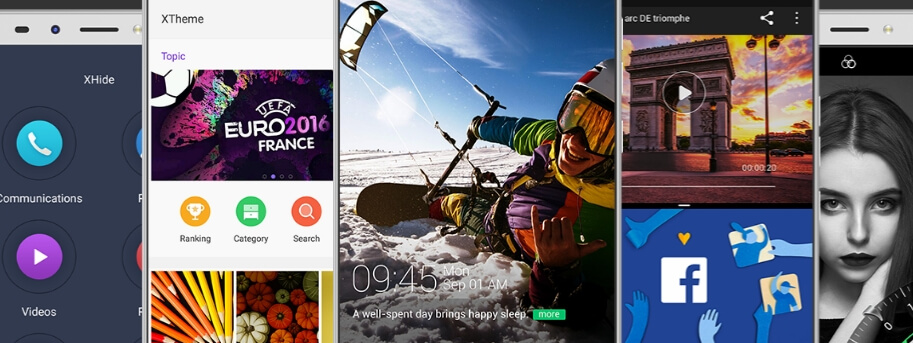
Talking of the XOS Family Apps, as do most original equipment manufacturers (OEMs), infinix ships with a heavily customized user interface (UI).
In a bid to set themselves apart, Infinix XOS is a beautiful customizable skin based on Android. While Android purists swear by the stock UI created by Google, we beg to differ. OEMs do put heart and soul into a visually pleasing UI.
Across various price and quality scales, smartphone design and specs have reached saturation point to almost achieve homogeneity. Seeing as there’s only so much OEMs can do to set themselves apart from their rivals, a custom UI is the way to go.
Infinix’s XOS UI such as XOS Chameleon and the newer XOS Hummingbird bring a bunch of custom features. The XOS family apps let you customize your device in so many ways and all without needing to root your device. Share on XWell then, let’s have a look at what you can do.
1. Customization with Xtheme
Xtheme which is in truth a launcher is regularly updated with beautiful themes, wallpaper and fonts. All these are free to download and the fonts (We are using Ginkgo) are deployed over the entire OS.
This means that you take your font to your apps including browsers for a custom look and feel. In a few clicks, you will have your entire device revamped to mimic other custom launchers.
2. Optimization with Xmanager
In a nutshell, the XManager bundles up the following features: Mobile cleanup, App manager, Bandwidth manager and Auto-start manager. Let me break this down some more and see what each aspect entails:
Mobile cleanup clears cached trash, installation APKs and large files chewing up your storage space.
App manager lets you dictate which apps can send notifications, and provides one-touch app uninstall. More to that, you can also force stop or disable apps altogether if you so wish.
Bandwidth manager lets you create and monitor a mobile data plan by specifying monthly usage. You can toggle the Autodisconnect button to cut off data once you reach a specified data limit.
And one more thing. Under network manager, you can set whether to allow an app to use your mobile data or not.
Auto-start manager lets you set which apps to run automatically once you power on your device.
3. Power management with XPower
One of my best XOS family apps, XPower is your one-stop app to manage everything to do with power and battery life. By default, your device is set to Normal mode which optimises system functions with optimum battery usage.
“To hell with power optimisation,” you say? Well, in that case, you can go out on all cylinders in blazing glory with High-Performance mode.
Sure, your estimated battery will deplete faster, but at least you can finally see your Infinix device in beast mode.
4. App lock and permission management with XSecurity
On top of the Android System passcode lock/fingerprint/Face ID, XOS provides a second layer of security in the form of XSecurity. Many apps, including WhatsApp don’t have a way to prevent unauthorized access.
App lock lets you do just that. This way, you can prevent snoopers from checking out your Gallery, downloading games on the Play Store, and much more.
XSecutity’s Permission management is another important tool worth checking out. It’s a one-click feature which shows you what permissions your downloaded apps have allowed themselves.
Make your you check what apps use your camera, location, microphone, contacts, and what not. Share on XI cannot stress enough how important it is to have a phone passcode lock. In this day and age, some people walk around with unlocked phones, and we wonder why.
This is no difference from a human inviting a vampire into their house. Do it once and there’s no taking it back. Your phone is home to all manner of sensitive data and information.
In the wrong hands, things can go real bad real fast. This is my second best infinix ios app.
5. Hide your apps with XHide
If at all the XSecurity feature doesn’t do it for you, perhaps XHide might be more to your liking. XHide disappears icons from your app list. Not convinced? You better be.
XHide is so thorough that the app in question disappears altogether, even in the App list. Going to the Play Store doesn’t help either. The only option you get is to uninstall it.
A good application for XHide, for instance, would be that time you need to hide games from your kids, and also private apps like your banking apps. We leave it up to you.
This is another amazing xos app. XShare works exactly as advertised with one caveat. The other person needs to have XShare installed on their device as well.
If you have used Xender before, XShare won’t be any different. Once you have pinpointed what to send, XShare will provide a QR code. On the other phone, you have to click receive after which you can scan the QR code to get connected. Simple as that.
7. Online backup with XCloud
XCloud is an XOS feature which lets you automatically backup and restore your contacts, messages, call logs, notebook, saved Wifi passwords and favourited FM radio stations.
This way will ensure you retain your data even after a factory reset or changing devices. But to do so, you need to have an XAccount, which brings us to our next XOS feature.
8. Access XOS apps with XAccount
From our observations, you need an XAccount to access XCloud and XClub. You also earn Xgold and badges which range from VIP1 badge to VVIP badge for outstanding contribution.
Some of the ways to contribute to the community and earn Xgold is to complete certain tasks in the XAccount. These include updating your picture for 20 Xgold and improving information in the community for 30 Xgold.
I am not yet sure as to the rationale of the badges and the Xgold, and it does seem like personal data harvesting. But who are we to judge?
9. Contribute to the XOS community with XClub
XOS Family Apps, xClubInfinix runs an active XOS community with XClub. In this forum, official Infinix Administrators and moderators interact with Infinix users across the globe.
If you imagine these forums quiet abandoned alleyways, think again. The community is thriving. Infinix regularly updates its fans on what’s new and hip.
It’s a treasure trove of information, from tips and tricks, reviews, news, discussions, even after sales service. Kudos for that, Infinix.
Conclusion
The xos family consist of great tools for all Infinix users as it creates opportunity ranging from security to customization. It let you optimize standard values through basic usage i.e it is easier and simple to use.
Furthermore, kudos to Infinix for making this tools available to all. I mean if this hasn’t been added to the XOS feature, who will question them.
Moreover, these family tools are quite superb to use as there is no need to download applock or any other tools relating to this family tools.
Software from third parties sometimes comes with ad or unnecessary contents but this XOS Family has made smartphone usage to be helpful.
More Infinix guides
- Want to customise this phone? See our root and bootloader unlock guides.
- 10 Amazing Features and functionalities You'll Love About Infinix Phones
- 10 key features of Android 8.0 Oreo on Infinix devices
- Review: Infinix 3.0 User Interface – Humming Bird
- Review: Infinix XOS Chameleon Features and Specs
- All Infinix reviews & comparisons