
How to Check If an Infinix Phone Is Original
Five checks that tell a genuine Infinix phone from a fake or tampered one.
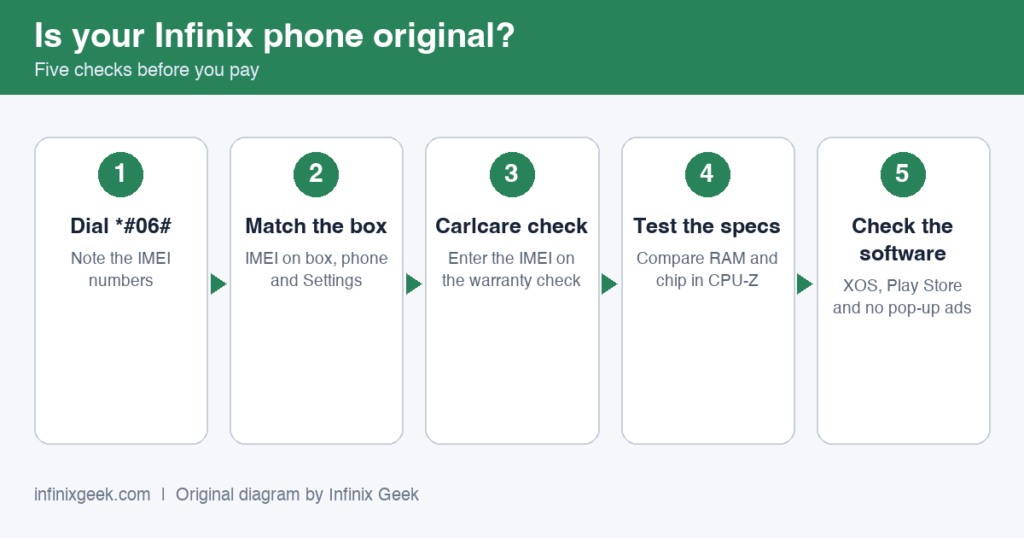
Fake and refurbished-as-new Infinix phones are common in markets where the brand is popular. They look the part, but inside there’s a slower chip, less storage than the box claims, and software that may be full of adware. This guide shows how to check whether an Infinix phone is original before you pay, using the IMEI, the official Carlcare warranty check, the phone’s own settings and a few physical checks.
These checks use the phone’s IMEI, Infinix’s official after-sales service (Carlcare), and the settings every genuine Infinix phone has. Warranty pages and IMEI services differ by country, so use the one for where you bought the phone. Sources are listed at the end.
The short answer
- Dial *#06# and note the IMEI number or numbers.
- Check that they match the box label and Settings > My phone.
- Enter the IMEI in the Carlcare warranty check for your country. A genuine phone shows its model.
- Check that the model, RAM and storage in Settings match the box, then confirm them with an independent app.
- Be suspicious of a price far below other shops, a damaged seal, or a box with no IMEI label.
Check 1: The IMEI number
Every phone has a unique IMEI, a 15-digit number. Dual-SIM phones have two. Open the phone app and dial *#06#. The IMEI numbers appear on screen straight away.
Now compare them with two other places:
- The box: a genuine Infinix box has a printed label with the model, IMEI numbers and other codes.
- Settings: open Settings > My phone (or About phone) and look for IMEI, sometimes under Status.
All three must match exactly. If the dialler shows a different number from the box, shows 0 or a row of the same digit, or shows nothing at all, walk away. A mismatch can mean a fake phone, a swapped box or a tampered phone that may be blocked by networks.
Check 2: Carlcare’s official warranty check
Carlcare is the official after-sales service for Infinix, Tecno and itel. Its websites and app include a warranty check: you enter the IMEI and it shows the model and warranty status of a genuine phone.
- Go to the Carlcare website for your country, or install the Carlcare app from the Play Store.
- Open Warranty check and enter the first IMEI.
- Check that the model shown matches the phone in your hand.
If the check says the IMEI doesn’t exist, or shows a different model, the phone is probably not genuine or not what the seller says. A new phone’s warranty may show as not yet activated until it’s been used for a while, so a model match is the important part.
Some countries’ telecoms regulators also run their own IMEI checks, such as Pakistan’s PTA DIRBS. These tell you whether a phone is registered and allowed on local networks. They’re worth using where they exist, because an unregistered phone may stop working on your SIM.
Check 3: Does the phone match its specs?
Fakes often claim more memory and storage than they really have, because the software is edited to show false numbers. Check in three steps:
- Look up the official specs for the model on Infinix’s website for your country.
- Compare them with Settings > My phone: model name, RAM, storage, Android version and XOS version.
- Install an independent hardware app such as CPU-Z or AIDA64 from the Play Store. These read the chip, memory and screen directly. If they show a different chip or less RAM than Settings, the phone has been tampered with.
Also check that the storage is real: Settings > Storage should show close to the advertised amount, minus what the system uses. A 128 GB phone that shows a “128 GB” total but can’t store more than a few gigabytes of video is a fake.
Check 4: The software
Genuine Infinix phones run XOS, Infinix’s own version of Android. Signs that something is wrong:
- No XOS version in Settings, or an Android version that the model never shipped with.
- Pop-up ads on the home screen or lock screen from apps you can’t uninstall.
- No Google Play Store, or a Play Store that says the device isn’t certified (open Play Store > Settings > About, and look for “Play Protect certification”).
- No system updates at all in Settings > System update.
Check 5: The box and the phone itself
- Box: sharp printing, correct spelling and a sealed box when sold as new. The model number on the box should match Settings.
- Accessories: genuine Infinix chargers carry the brand and their output rating. A very light charger with no markings is a warning sign.
- Build: buttons that wobble, a camera bump with fake lenses, or a gap between the screen and frame suggest a copy or a poor repair.
- Price: if a shop is far cheaper than everyone else for a brand-new phone, ask why. Grey imports can be genuine but may lack a local warranty.
Buying second-hand? Check these too
- Ask the seller to factory reset the phone in front of you, and make sure it sets up without asking for their Google account. See our factory reset guide for why this matters.
- Check the IMEI against your country’s blacklist or regulator service, if there is one, to make sure it isn’t reported stolen.
- Check the battery: charge it, use it for a while, and see if the percentage drops unusually fast. Our battery drain guide explains what’s normal.
Frequently asked questions
What does *#06# show on an Infinix phone?
The IMEI number for each SIM slot. It works on every genuine Infinix phone, with or without a SIM.
Can an IMEI be faked?
Yes. Some copies show a copied IMEI from a real phone. That’s why you should combine the IMEI with the spec check and the software check, not rely on one check alone.
Is a phone bought online without a local warranty fake?
Not necessarily. It may be a genuine import for another country. It should still pass every check above, but Carlcare in your country may not repair it under warranty.
Where can I report a fake Infinix phone?
Contact Carlcare or Infinix support in your country, and keep the receipt. In many countries the consumer protection authority also handles counterfeit goods.
Sources
- Carlcare warranty check by IMEI: iNews (Indonesia), Techroid (Pakistan)
- Carlcare as Infinix’s official service: Infinix India
- Checking Play Protect certification: Google Play Help
Shopping for a new phone? See the best Infinix phones in 2026 and our reviews hub.