
How to Unlock Bootloader on Infinix Hot 6X & Install TWRP Recovery
Step-by-step guide to unlock the bootloader on the Infinix Hot 6X and install TWRP recovery, with prerequisites, USB driver setup and tips to avoid errors.

Infinix mobility is back with another addition to its Hot-series and it is none other than the Infinix Hot 6X.
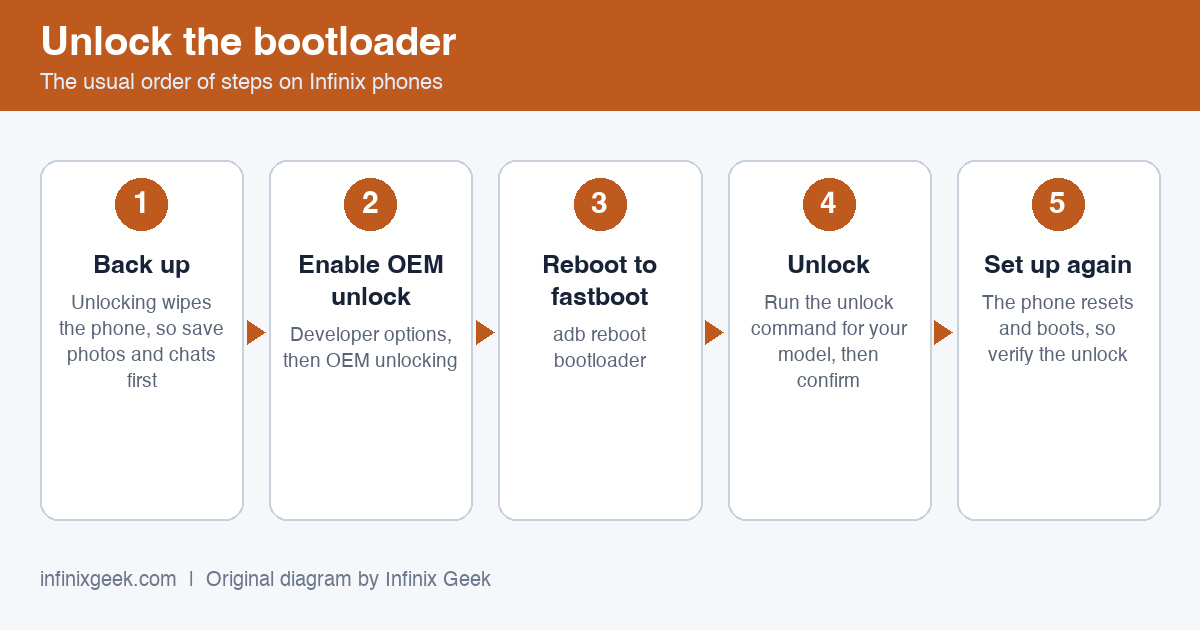
This is a legacy guide written in 2019 for the Infinix Hot 6X on its original Android version. We have not re-tested it on current firmware, and it is not meant for newer Infinix phones.
- It wipes your phone. Unlocking the bootloader erases all data. Back up anything you want to keep first.
- It can stop your phone booting and may affect your warranty. Have the stock firmware for your exact model ready before you start.
- Match your model exactly. Check the model code under Settings > About phone. Never flash a recovery, ROM or file made for a different model.
- If an unlock command fails (for example “unknown command” or “FAILED”), stop. Newer phones use
fastboot flashing unlock, older onesfastboot oem unlock, and some firmware does not allow unlocking at all. - Use maintained tools. TWRP builds for these phones are unofficial community ports, and SuperSU is no longer maintained. Magisk is the current root tool.
Featuring a crafty notch and some nice specs to follow, the smartphone is still very much a budget smartphone.
However it’s high time, Infinix stopped touting a Qualcomm chipset as a solid feature knowing full well it is a low-tier SoC.
There is also the fact that Infinix is using the word AI camera on the smartphone which just shows smarts instead of artificial intelligence.
It is quite nice that the smartphone has a great battery capacity on it with a stated 2 day battery life according to to Infinix.
A number of Infinix phones have a battery somewhere in the region of 4,000 mAh which is exactly what you have here.
Also, there is the Adreno 308 GPU which means gaming won’t really be much of a thing especially the heavy ones.
The Infinix Hot 6X comes in two variants, there is one with 2GB RAM and a 16GB internal storage.

A more premium version offers 3GB RAM as well as 32GB storage space. On the other hand, a memory card space is available to increase the storage up to 128GB.
On it there is Android 8.1 Oreo which makes it the closest to the latest Android 9.0 Pie out there.
In this article, I will show you how to unlock bootloader, install TWRP Recovery and root Infinix Hot 6X smartphone.
And with easy step by step instruction guide on how to successfully root. So, let’s straight away dive into the tutorial guide. Stay until the end.
What do you mean by unlocking bootloader and rooting?
Rooting a device, simply means that you are now able to take full control of your Android device.
After rooting, the smartphone has the ability to customize beyond limits.
TWRP Recovery is a Custom Recovery which is Official known as TeamWin Recovery.
It’s built with a touch screen interface which allows its users to install third-party firmware and backup their current system, which is often unsupported by stock recovery images.
Things You Need
- PC
- VComm Drivers
- Infinix Hot 6X USB driver
- SP Flash Tool. Make sure you download the latest version
- Magisk (current version, from its official GitHub page)
- Adb and fastboot driver
Prerequisites:
Step 1: Back Up Anything You Want to Keep On Your Infinix Hot 6X
Before we begin, it’s important to mention: this process will erase all of your data. So if you have any photos or other files on your phone that you want to keep, transfer them to your computer now.
In addition, if you have any app settings you want to keep, use their backup function to create a backup settings file, and transfer those to your computer as well.
Here’s an extra tip: Since I know I’m eventually going to root my phone, I always unlock my bootloader as soon as I buy a new device. That way, I don’t waste time setting it up only to erase the phone in a few days and do it all over again.
If you’re an obsessive Android tweaker who knows you’re going to root soon, consider unlocking before you go through the trouble of setting up your phone.
Step 2: Then, make sure that your device has at least 50% to 60% of battery backup, as the rooting process is always a time-consuming one and if your device gets switched off in the middle of the rooting process due to lack of battery backup, it will get bricked.
Step 3: Next, enable the USB Debugging Mode in your smartphone by following this path: Settings ->Developer Options -> USB Debugging. If you can’t see the developer options in your device Settings, then enable it by following this path: Settings -> About Phone (tap on the Build Number for 5-7 times to enable it).
Step 4: Download and install the Infinix Hot 6X USB driver your computer. By doing this, you will be able to connect your smartphone to the computer.
After finishing all these prerequisites, you can move forward to the tutorials given below.
How To Unlock Infinix Hot 6X Bootloader
- Download and install the Twrp Recovery
- Download ADB folder and Fastboot driver Installer.
- Now Install Correct ADB and fastboot Driver on Your PC
- Go to ADB folder then connect your device the to PC Via USB cord
- Type “Cmd” at the top URL bar of your drive C to bring the Command Layout
- Then type this command “Adb Reboot bootloader”
- Your Device should boot into Fastboot Mode
- The recovery you downloaded (Rename to it to recovery) then move to the adb Folder.
- Now type this Command “Fastboot flash recovery recovery.img”
- The above command will make ADB flash the Recovery you copied to Adb folder
- Now type this Command “Fastboot Reboot” to reboot your device to normal Mode
About the one-click recovery kit
An earlier version of this guide offered a one-click “recovery kit” (a Windows program from an unknown third party) as a second method. We have removed it because we cannot verify where it came from or what it does. Use the manual fastboot method above.
Well, here are some of the Pros of rooting the Infinix Hot 6X Android device:
- First of all, the user takes the control of the phone.
- And also customize the user interface and control the frequency of the CPU as well as GPU.
- There are also different available Mods that can be downloadable for free.
- You can also, Install Custom ROMs on the phone.
- In conclusion, you can customize the Infinix Hot 6X Android phone beyond limits.
Now let’s see some of the cons of rooting the Infinix Hot 6X Android smartphone:
- Firstly, the warranty is void after rooting the device.
- And your phone could be completely dead and not usable anymore. (If anything goes wrong)
- Also, performance issue may arrive due to lack of optimization for the particular model.
So now that you have seen Pros and Cons of rooting the Infinix Hot 6X, Let’s see step by step tutorial on how to root the phone.
To Read: How to Unlock Bootloader on Infinix Hot 6 and Hot 6 Pro
How To Root Infinix Hot 6X
- Reboot your device into Recovery Mode with the below command
- ADB reboot recovery
- You are advised to create a nandroid backup now
- Do a factory reset
- Flash Magisk, following the installation notes on its official GitHub page (SuperSU is no longer maintained)
Congrats! Your smartphone is now rooted.
How To Root Infinix Hot 6X Without PC Using KingRoot
- Download KingRoot on your smartphone.
- Install KingRoot.
- Open App and Run it.
- Follow the instruction given on screen.
- Reboot at the end.
- You’re done!
I believe with this tutorial to unlock, install bootloader and root your Infinix hot 6X will not be a problem for you at all.
VERDICT
Well then, after finishing all this steps carefully, you’re now getting a customized smartphone tailored to meet your satisfaction as you have broken the chains that limits what your smartphone can offer.
More Infinix guides
- Before you start: install the Infinix USB drivers and keep the stock ROM handy as a backup plan.
- How to Root Infinix Hot 6 and Hot 6 pro | Unlock Bootloader & Install TWRP Recovery
- How to Unlock Bootloader on Infinix Hot 6 and Hot 6 Pro
- How To Root Infinix Hot 7 | Unlock Bootloader & Install TWRP
- How to Root Infinix Hot 5 | Unlock Bootloader & Install TWRP Recovery
- Root & unlock guides for all Infinix phones